
Modular Permissions
Everyone sees only their own work
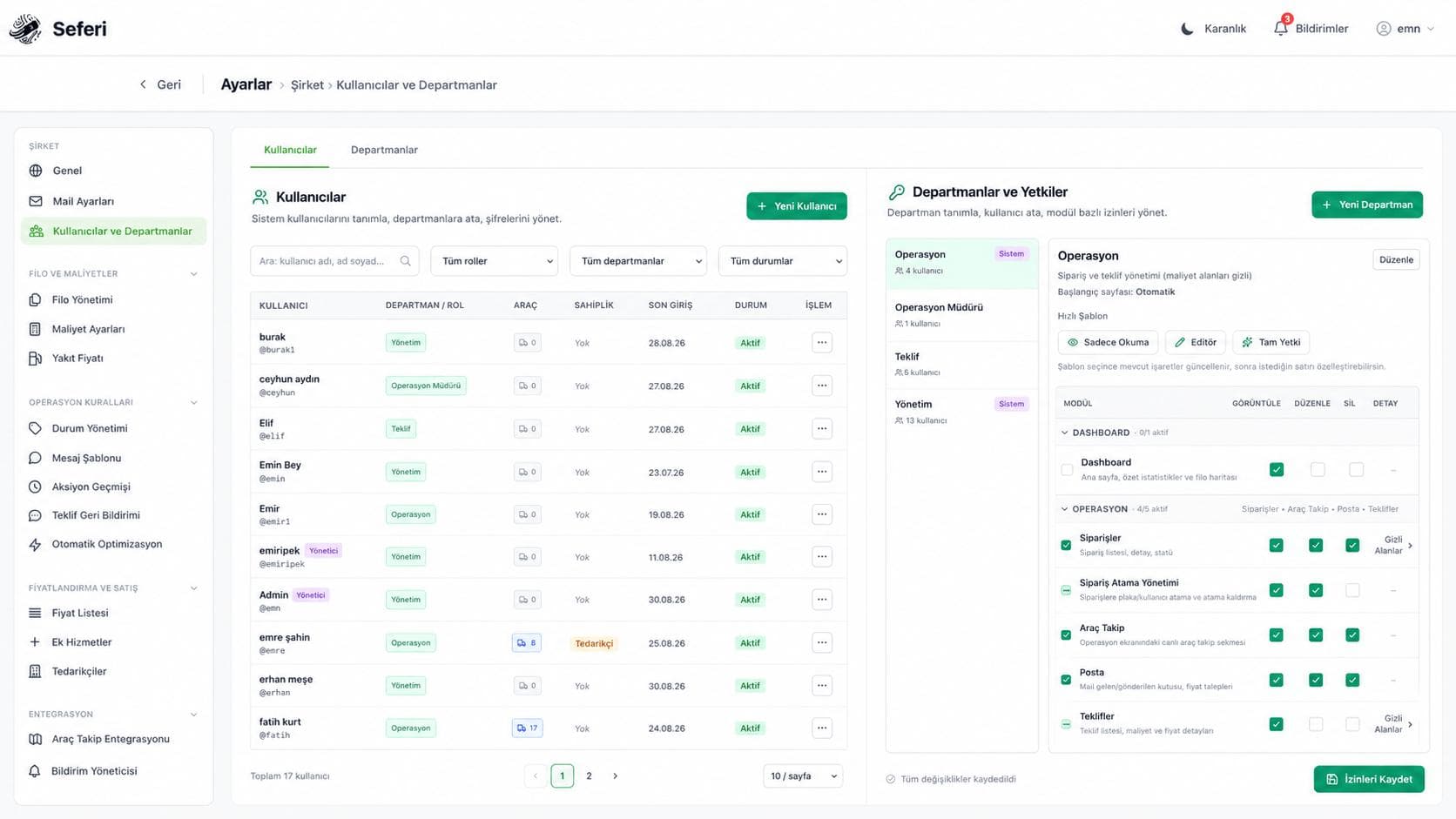
- Per module
- View and edit granted separately
- Row level
- Only the jobs for their own vehicles
- Audit log
- Who changed it, when, and what it was
Some of the brands that trust us



- and more
The module from start to finish
The quoting team can price a job without seeing your cost lines. A planner can assign a plate without touching the price list. Someone responsible for ten vehicles is not lost among thirty. You decide who can see and change what.
Product screen
Granting access is not the same as showing every job
What a person can do (module rights), which jobs they see (row-level visibility), and whether the feature applies to the company type at all. Keeping them apart prevents confusion as teams grow.
How the work flows
Everyone starts where their work starts
Each department gets a landing page: a planner lands on Operations, accounting lands on Reports.
- 1
A department is defined
- 2
Module permissions are ticked
- 3
Vehicles are assigned to the user
- 4
The change lands in the audit log
Panels on the screen
Company type is not a permission problem
A forwarder has no vehicles, so the fleet map is closed to them — even when the manager holds every right. Keeping that distinction removes the need to hand-edit permissions for each new company.
PermissionsThe quoting department can price a job without seeing your cost lines; a planner can assign a plate without touching the price list.
What's on the screen
The real names of the panels inside the product, and what each one shows.
- Departments
- Rights are defined per department, with view and edit granted separately for each module.
- Users
- A person can sit in more than one department with a primary one set, and plates are assigned to them.
- Ownership Regions
- Which province is served by your own fleet and which by subcontractors is defined province by province.
- Audit Log
- Creation, update, status change and send records across orders, quotes, customers, suppliers and price requests.
- Contracts
- Modules opened by the commercial package, and company-specific add-ons, are managed separately.
What does this module take over?
On the left how it runs today, on the right how it runs in Seferi.
Giving someone access to quote also exposes your cost lines.
Rights are granted per module and per field; the quoting team prices work without seeing cost.
A planner responsible for ten vehicles gets lost among thirty.
Row-level visibility: they see only the jobs for their own plates, plus jobs with no plate assigned yet.
Used in the daily work
Every item maps to a screen inside the product — none of it is a roadmap.
- View and edit rights per module, defined per department
- Ready templates: read-only, editor, full access
- Hidden fields — access to the module, sensitive columns closed
- A user can belong to several departments, with a primary one
- A landing page assigned per department
- An audit log for critical changes
Who uses it
The same module does not open the same screen for everyone on the team.
Manager
Sets up departments, ticks module rights, assigns a landing page per department.
Planner
Sees only the jobs on their own plates, plus jobs with no plate assigned yet.
Quoting desk
Sets prices but cannot see the cost items.
Once this module is switched on
In the demo you see these on your own data.
Sensitive fields stay closed to unauthorised eyes.
Everyone sees only their own work.
"Who changed this?" always has an answer.
What gets asked most before a demo
Can one person be in more than one department?
Yes. A primary department is set and the landing page follows it.
What is kept in the audit log?
Who made a critical change, when, and what it was before. For sensitive fields like price, rights and cost, "who changed this?" has an answer.
What happens to the fleet screen at a forwarder?
It never opens. That is not a rights problem — a forwarder's manager has every right; the feature simply does not exist in their business model.
See Permissions running on your own operation
The demo is not a slide deck; it is a session that runs on your own data.
- 01
A 30-minute call
We listen to your operation: how many vehicles, which lanes, which step is still done by hand today.
- 02
A run on your own data
We read a real request from your own inbox and turn it into a quote; you see your own lanes on screen.
- 03
A rollout plan
Which module goes live on day one, what gets migrated, and the per-vehicle price — in writing.